Hosting client websites can be a useful source of recurring revenue for a web agency. It also gives clients one place to go when something goes wrong, rather than leaving them to deal with a hosting company that knows nothing about their website.
The difficulty usually appears as the number of clients grows.
A handful of websites can be managed with saved SSH connections, a spreadsheet and a few calendar reminders. Once an agency is responsible for dozens of websites across multiple servers, that informal approach becomes harder to maintain.
Developers need access. Freelancers come and go. PHP versions change. SSL certificates expire. Disks fill up. Background workers stop. Someone needs to know which provider account owns each server, where the backups are stored and what will happen if a client leaves.
A manageable hosting service needs a repeatable system. This guide covers the areas agencies should standardise, from server ownership and developer access through to deployments, monitoring, backups and billing.
Before setting up a server, agree who will own the account with the infrastructure provider.
There are two common approaches.
The client creates the account with the cloud provider and pays the infrastructure bill directly. The agency is then given access to configure and manage the server.
This arrangement can make offboarding easier because the client already owns the infrastructure. It also keeps the provider contract and billing relationship between the client and the provider.
The downside is that the agency may need to work across numerous provider accounts, each with different login details, billing contacts and security settings.
The agency creates the server within its own provider account and includes the infrastructure cost as part of the client’s hosting fee.
This gives the agency more control over provisioning, billing and technical standards. It is often easier to manage when the agency hosts a large number of smaller client websites.
However, the agency also becomes responsible for keeping accurate records. It must be clear which servers, backups, IP addresses and other resources belong to each client.
There is no single correct model. Some agencies use client-owned accounts for larger projects and agency-owned infrastructure for smaller managed hosting packages.
Whichever approach you choose, document it in the client agreement. The agreement should explain:
Unclear ownership causes avoidable disputes, particularly when a client decides to move to another agency.
Allowing every project to use a different operating system, server provider and deployment process creates unnecessary work.
A standard stack makes troubleshooting quicker and reduces the amount of specialist knowledge the team needs to retain.
An agency might standardise on:
There will always be exceptions, but they should remain exceptions. A new framework, database or server configuration should be introduced because the project requires it, rather than because an individual developer happens to prefer it.
It also helps to define a naming convention.
A server named production-1 may make sense when it is created, but it becomes less useful once the account contains fifty similar servers.
Include information such as the client, environment, purpose and region:
acme-production-web-uk
acme-staging-web-uk
example-production-database-eu
Use the same naming approach for provider instances, ServerAuth records, monitoring services, backup jobs and internal documentation.
A single large server may initially seem cheaper than several smaller servers. It also creates a larger failure domain.
If the server runs out of disk space, suffers a configuration problem or requires an urgent reboot, every client on it may be affected. One busy website can also consume resources needed by unrelated clients.
Separate servers are particularly sensible when:
Smaller brochure websites can still share infrastructure, provided they are isolated properly and the server has enough capacity.
Each website should have its own system user, database and deployment credentials. File permissions should prevent one website from reading another website’s files. A compromised application should not automatically give an attacker access to every other client project on the server.
Every agency offering hosting should maintain a central inventory of its infrastructure.
For each server, record:
This information should be accessible to more than one senior developer.
A hosting service becomes fragile when one person knows how everything works and everyone else needs to ask them before making a change. Documentation does not need to describe every package installed on the operating system, but another competent team member should be able to identify the server, gain authorised access and understand what it is responsible for.
ServerAuth can provide a central interface for servers from different providers, including existing servers that are already running. Its current server management tools cover areas such as website deployment, SSH access, firewalls, cron jobs, logs, databases, Supervisor processes and server monitoring.
Shared passwords and shared private keys make access difficult to control.
Every member of the development team should use an individual SSH key. Their public key can be added to the servers they are authorised to access, while the private key remains on their own computer.
This provides several practical benefits:
Private keys should be protected with a passphrase. Developers can use ssh-agent or their operating system’s keychain to avoid entering that passphrase for every connection.
Access also needs to be reviewed when someone changes role or leaves the agency. Removing a user from Slack, email and the project management system does not remove their public key from a server.
Contractor access deserves particular attention. A freelancer working on one project rarely needs permanent access to every production server.
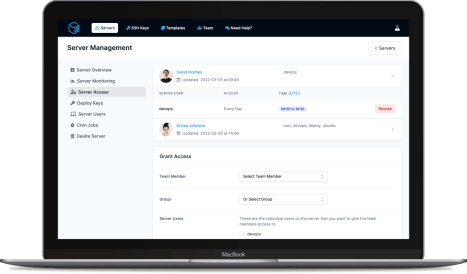
ServerAuth allows team members to manage their own SSH keys while account administrators control which servers and system users they can access. Access can also be restricted by day, time or date range, which is useful for temporary contractors and project-based work.
Server access should follow the same principle as access to source code, billing systems and client records. People should have enough access to do their work, without receiving access to unrelated systems.
A front-end developer fixing CSS on a staging website probably does not need root access to its production server. A contractor maintaining one Laravel application does not need access to every WordPress website managed by the agency.
Useful access groups might include:
It is also worth separating routine server tasks from unrestricted shell access.
A developer may need to view logs, restart a queue worker or deploy a website. Providing those actions through a controlled management interface can reduce the number of occasions where someone needs to log in as a privileged user.
Manual deployments often begin with a developer connecting over SSH, pulling the latest branch and running a few commands from memory.
This works until one of those commands is missed.
A deployment process should be written down and repeatable. At minimum, it should define:
Production deployments should come from version control. Developers should not edit production application files directly because those changes can disappear during the next deployment and may never make it back into the repository.
Automatic deployment can work well for lower-risk websites, particularly when it is triggered from a dedicated production branch. More sensitive applications may require an approval step before deployment begins.
ServerAuth supports deploying websites and applications from a connected repository, including common PHP applications and frameworks. It can also manage related services such as databases, cron jobs and Supervisor processes from the same interface.
A staging site gives developers somewhere to test updates without experimenting on a client’s live website.
It should be treated as a separate environment, with its own:
Avoid copying a production database into staging without considering the information it contains. Customer records, order details and personal data may need to be removed or anonymised.
Staging sites should also be protected from public access and search engine indexing. Password protection, IP restrictions or another authentication layer should be used where appropriate.
A useful deployment flow is:
Local development
      ↓
Pull request and review
      ↓
Staging deployment
      ↓
Testing and client approval
      ↓
Production deployment
Smaller projects may use a simpler process, but production should never be the first place where a substantial update is tested.
A server being online does not mean its websites are healthy.
Basic monitoring should cover:
Disk usage deserves particular attention. A server can continue working normally until a log file, backup directory or application upload fills the remaining storage. Once the disk is full, databases may stop accepting writes, deployments may fail and websites can begin returning errors.
Set warning levels early enough to allow someone to investigate. An alert at 98 per cent disk usage may arrive too late to prevent disruption.
Server load also needs context. A brief increase during a deployment or backup may be normal. Sustained high load, steadily increasing memory use or a sudden change in traffic deserves investigation.
ServerAuth monitoring tracks server load, memory and disk usage, with historical data available through its management interface. Its log viewer provides access to common system and service logs without requiring a separate SSH session.
A backup is only useful when it can be restored.
Provider snapshots are helpful, but they should not be the only copy of important client data. They may be stored in the same provider account as the server, and deleting or losing access to that account could affect both the live server and its snapshots.
A basic agency backup policy should specify:
Website files and databases may need different schedules. Application code can often be recovered from Git, while customer uploads and database records cannot.
An ecommerce database might require frequent backups because losing a day of orders would be unacceptable. A small brochure website that changes twice a year may have less demanding requirements.
Define two targets for each hosting package:
Recovery point objective
How much recent data could the client lose after a failure?
Recovery time objective
How long should it take to restore the service?
A promise of “daily backups” says nothing about when the website will be restored or how much work may be lost. Recovery targets provide a clearer basis for planning and pricing.
Test the restoration process periodically. A backup job reporting success does not prove that the resulting files are complete, readable or sufficient to rebuild the website.
Scheduled tasks and long-running processes are easy to forget because they usually operate quietly.
Agencies commonly use cron jobs for:
Long-running applications may also use Supervisor to manage:
Keep a record of what each process does, which user it runs as and what should happen after a deployment.
A queue worker that continues running old application code after deployment can cause confusing faults. Deployment instructions should state whether workers need to restart and how that restart is performed.
ServerAuth includes web-based management for cron jobs and Supervisor daemons, allowing agencies to view and manage these processes alongside the server and website they belong to.
Servers need regular attention even when the websites on them appear stable.
Create a maintenance schedule covering:
Security updates should be applied promptly, but major version upgrades need planning. A new PHP or database version may affect older client applications.
Keep an up-to-date list of applications that depend on unsupported software. This gives the agency time to discuss upgrade work with the client instead of waiting for an urgent security or compatibility problem.
Maintenance work should also be included in pricing. A low monthly hosting fee may cover the server invoice while leaving no budget for updates, monitoring, backup checks and support.
The infrastructure bill is only one part of the cost of managed hosting.
A hosting price may need to cover:
Keep website maintenance separate from hosting where possible.
Hosting covers the environment required to keep the existing website available. Maintenance covers changes to the website itself, such as CMS updates, plugin testing, framework upgrades, content changes and bug fixes.
Combining everything into one cheap package makes it difficult to explain why a major application upgrade is additional work.
A simple package structure could include:
Suitable for brochure websites and smaller applications.
Suitable for ecommerce websites and important business applications.
Suitable for larger applications or unusual requirements.
Clients should understand what is included, what response times apply and which work will be quoted separately.
A checklist reduces mistakes and makes it easier for different team members to onboard clients consistently.
A practical onboarding checklist might include:
Store evidence of the completed checks with the client record. This is especially helpful when another team member needs to review the setup months later.
Offboarding should receive the same attention as onboarding.
When a client leaves, confirm:
Do not leave abandoned servers, monitoring checks or backup jobs running indefinitely. They continue to cost money and make the agency’s infrastructure harder to understand.
After the handover is complete, remove the client’s systems from normal dashboards while retaining any records required for contractual, accounting or legal purposes.
A well-run hosting service should not depend on one developer remembering how every server was configured.
Standardise the infrastructure, document ownership, use individual access controls and make deployments repeatable. Monitor the resources that commonly cause failures and test the backups that would be needed to recover from them.
Centralising this work also helps agencies use whichever cloud provider suits each project without maintaining a completely different management process for every server.
ServerAuth brings server access, website deployments, monitoring, logs, firewalls, databases, cron jobs and Supervisor processes into one web-based platform. Existing servers can be connected, so an agency can improve its management process without first moving every client to a new provider.
The result is a hosting service that is easier to support, easier to hand over internally and easier to grow as the agency takes on more clients.
ServerAuth provides a whole host of management tools, from controlling who can access your server, to managing your website deployments. And with an ever-growing suite of tools you'll always be one step ahead!
Start for free